no credit card required.no obligation.quick setup.
on — “It's refreshing to use an analytics tool that just works without any hassle.”
“Previously, I had all of my sites hooked up to Google Analytics, like most people. But I never looked at the reports. Now, I find myself dropping in and looking at the stats several times a day. It's very easy to digest and understand.”
“It just works, no need to navigate endless dashboards or worry about compliance issues. That simplicity saves us time and helps us stay focused on building our business.”
Simple Analytics is ideal for teams that want a minimal interface and straightforward traffic reporting with strong privacy defaults.
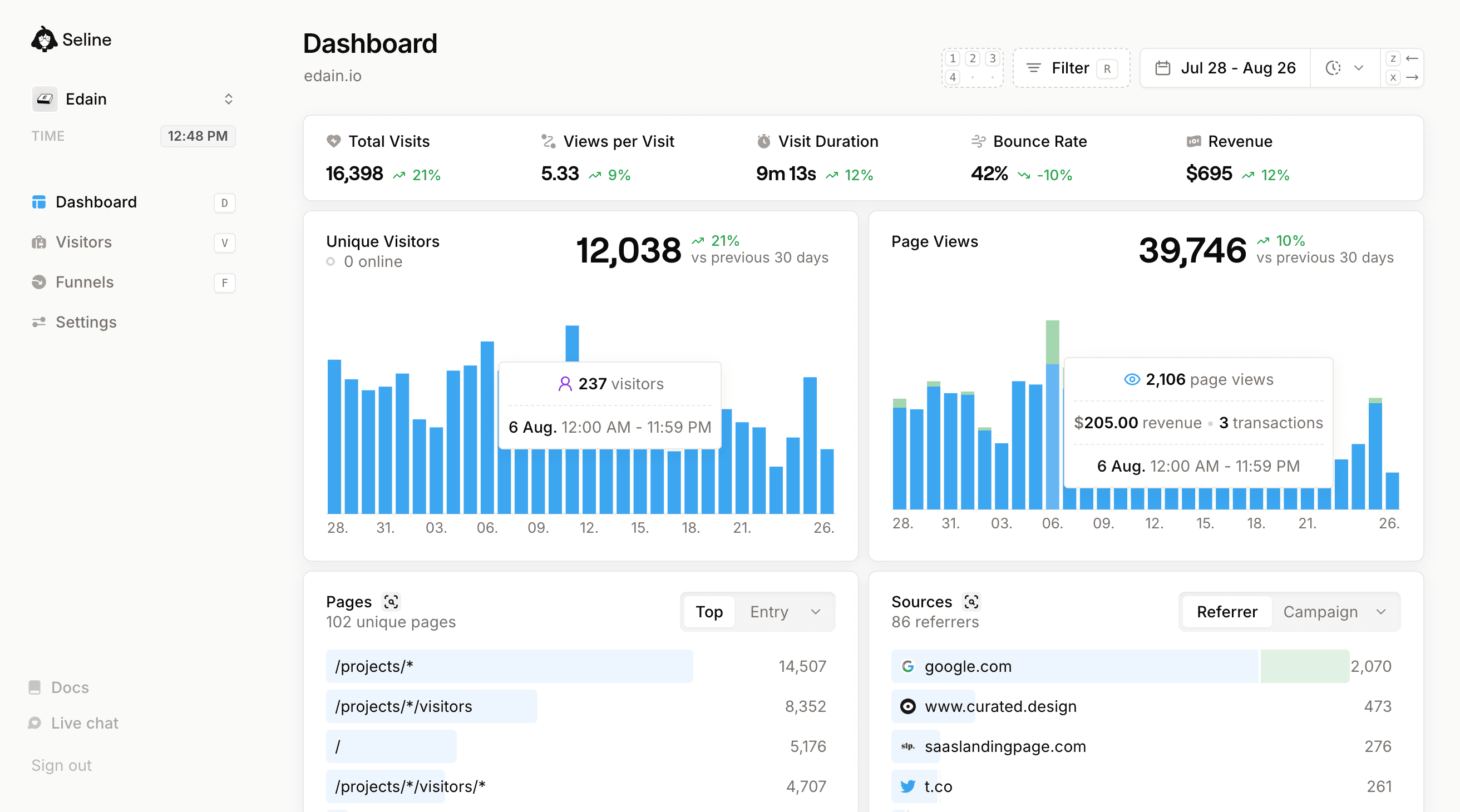
Seline keeps that same clean and easy workflow. You can use it as a simple dashboard every day, then open journeys and funnel views only when you want more context.
Simple analytics with optional deeper context
Read traffic clearly, then go deeper only when needed.
Real-time analytics dashboard
Both provide fast dashboards with clear website performance metrics.
Live view globe
Seline includes a live globe view for visitor activity. Simple Analytics stays focused on dashboard summaries.
Chat with AI
Both include AI chat to explore analytics in natural language, with different scope and workflow.
Privacy-first and cookie-less
Both products are privacy-first and built for low-friction compliance.
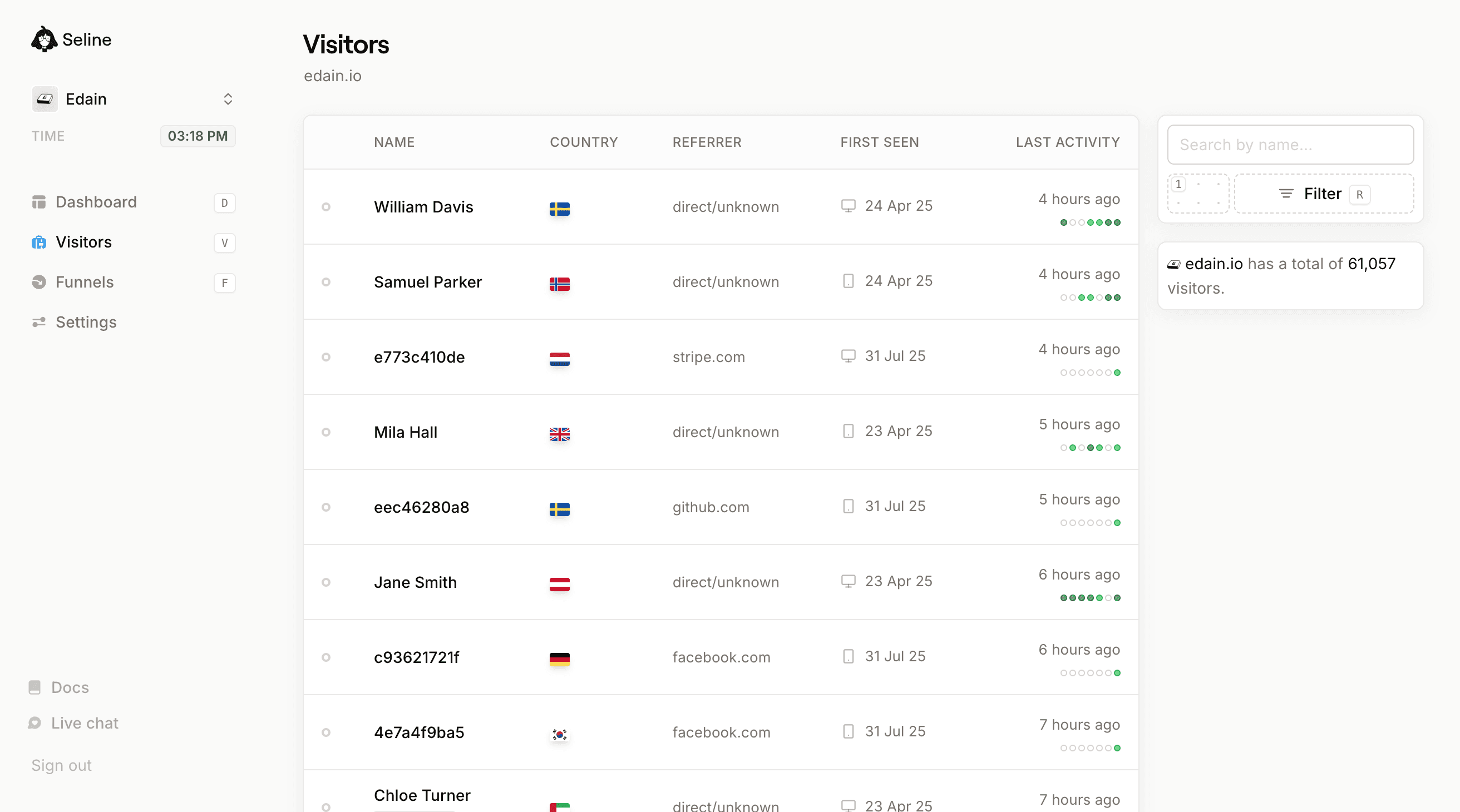
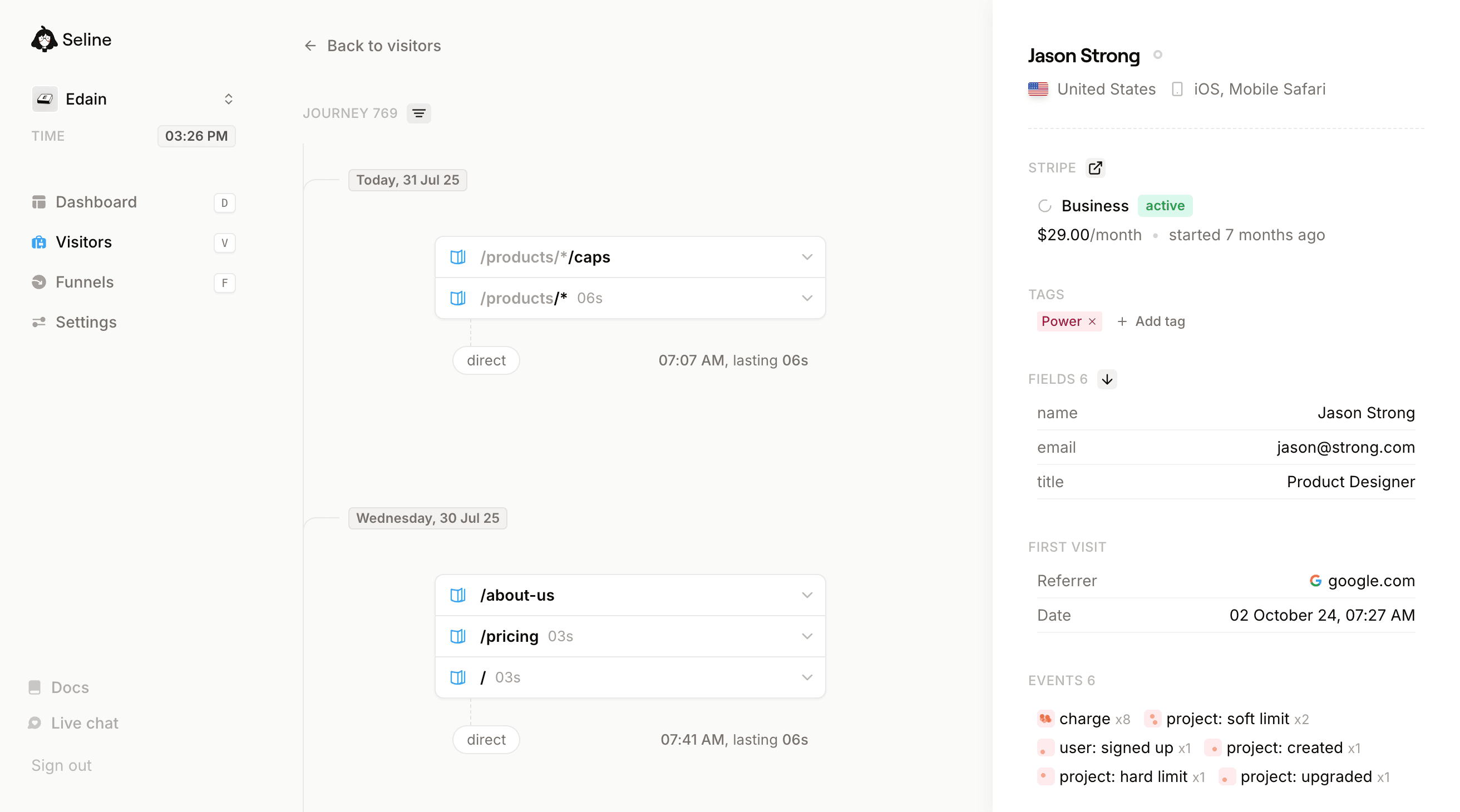
User profiles and journeys
Seline tracks person-level paths across sessions. Simple Analytics focuses on aggregate reporting.
Revenue analytics
Seline links channels, pages, and events to revenue outcomes. Simple Analytics focuses on traffic trends.
Simple setup
Both are quick to install with lightweight tracking scripts.
Predictable paid pricing
Both use transparent paid plans that scale as traffic grows.
Simple by default, more when needed
Seline keeps daily analytics simple and also includes funnels and journey context when you want extra detail.
Use cases where Seline adds more value
Simple Analytics is built for teams that value clear, aggregate traffic reporting with minimal friction. For many websites, that is a strong and practical default.
Seline keeps that same simple daily experience and adds optional depth for teams working on conversion growth. You can move from "what happened" to "why it happened" without changing tools.
Revenue attribution for growth
optional
Tie source and campaign traffic to paid outcomes so teams can prioritize channels by revenue, not visits.
Sources
6 referrers
Visitors
Revenue
google.com
1,840
$12,480$12,480
chatgpt.com
620
$8,210$8,210
reddit.com
1,150
$4,390$4,390
duckduckgo.com
410
$0$0
x.com
930
$1,260$1,260
bing.com
380
$640$640
Profiles and journey context
optional
Understand the sequence of actions before conversion, churn, or return visits without leaving your main dashboard.
Martha Falls
Sweden
,
FIELDS 6
Plan
Free
Company
Falls Inc
Role
Marketing
Bruce Wayne
United States
,
FIELDS 6
Plan
Pro
Company
Wayne Corp
Role
Engineering
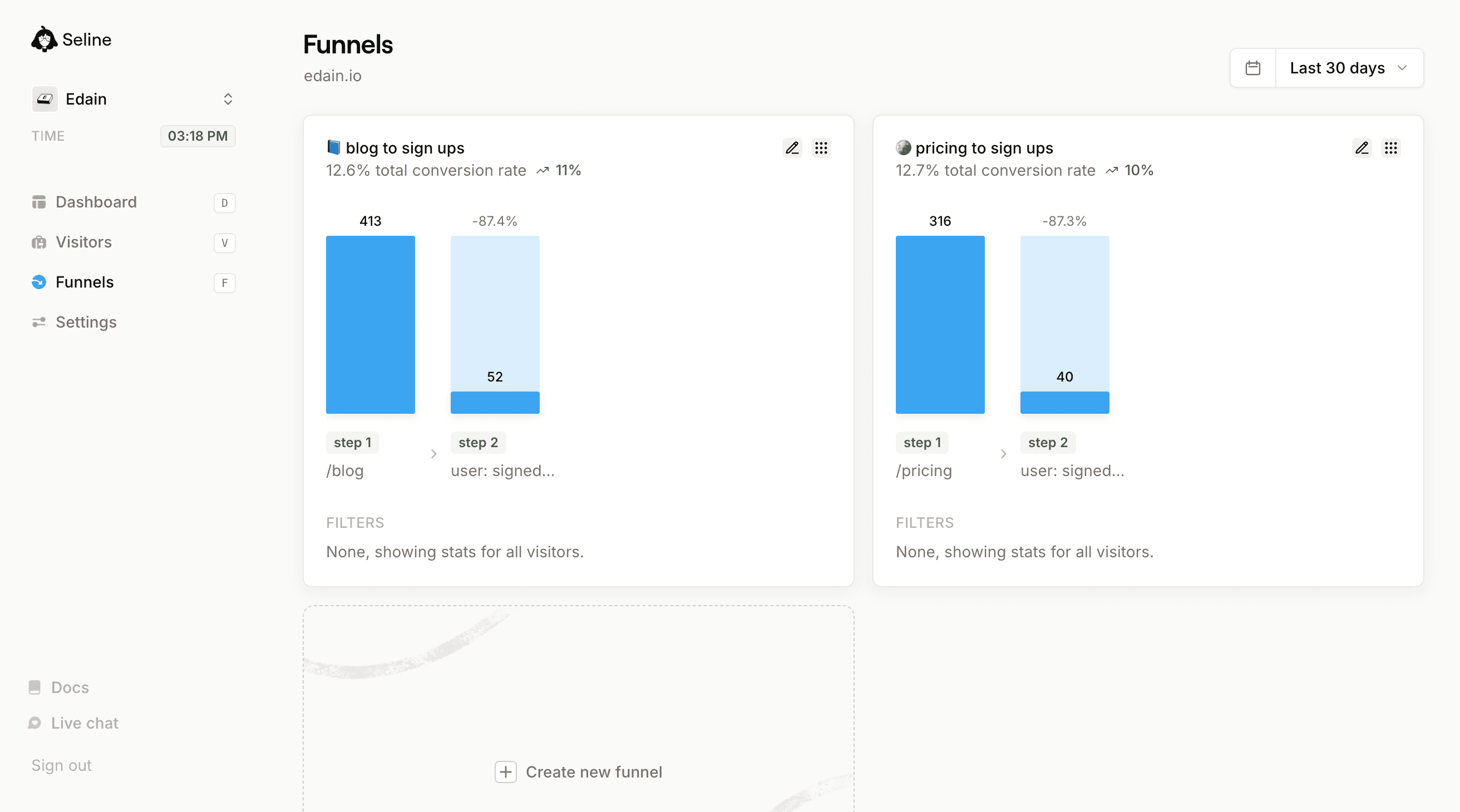
Funnels from visit to conversion
optional
Go from top-level traffic to clear drop-off analysis across signup, trial, and purchase steps.
6.46.4% total conversion rate
chatgpt.com
640640
288288
-55.055.0%
4141
-85.885.8%
step 1
/blog/*
step 2
user: signed up
step 3
project: upgraded
FILTERS
chatgpt.com
Chat with AI
no setup required
Ask direct questions about conversion changes and get fast answers without building new reports.
C
78 messages left
How to decide between Simple Analytics and Seline
Choose Simple Analytics if your team wants only lightweight, aggregate reporting for traffic trends and top pages. It is a strong fit for teams that do not need deeper product or revenue analysis.
Choose Seline if your team needs to move from reporting to optimization without losing simplicity. It stays easy for day-to-day checks and gives extra context when questions get more advanced.
Choose Simple Analytics if...
You only care about top-level traffic metrics.
You do not run detailed conversion experiments.
You want the smallest possible analytics workflow.
Choose Seline if...
You want simple daily analytics.
You optimize trial-to-paid or signup funnels.
You need journey-level visibility per user.
You want optional depth without a hard learning curve.
Simple migration steps
Install Seline script.
Port key events and goals.
Run both tools briefly, then cut over.
Have any questions or need help setting up or migrating?
Feel free to reach out to us via Done-for-you setup and migration services available.
What to expect after switching from Simple Analytics
Day 1
Same fast daily checks
Keep your familiar traffic workflow while gaining a cleaner path into deeper analysis.
Week 1
More conversion clarity
Journey and funnel views reveal where users drop off between landing, signup, and activation.
Month 1
Better growth prioritization
Revenue-linked analytics helps decide what channels, pages, and experiments deserve the next sprint.
Pricing
Simple Analytics has transparent pricing that scales with monthly traffic.
Seline keeps pricing simple too and adds optional conversion insight without changing the core easy workflow.
Depth of insight
Simple Analytics focuses on high-level metrics like pageviews, referrers, and event activity.
Seline adds user-level journeys, funnel analysis, and revenue linkage so teams can prioritize what drives growth.
Privacy and compliance
Both platforms are privacy-first and designed for compliant, lightweight analytics.
Seline is cookieless and stores customer data on EU servers, with strong defaults for teams focused on GDPR teams.
Setup
Both products are easy to deploy with a single tracking script.
Seline also offers quick setup flows for modern frameworks and custom events.
Performance
Both tools use lightweight scripts designed to keep page speed high.
When Simple Analytics fits best
Choose Simple Analytics if your team only needs clean aggregate traffic analytics with privacy-first defaults.
Choose Seline if you want the same simplicity plus user journeys and revenue visibility when your team needs more context.
Support
Seline support comes from the core product team, so questions about setup and analytics get direct answers.
Simple Analytics vs Seline FAQ
Yes. Seline is still very simple to use and keeps a clean interface, while adding optional journeys, funnels, and revenue analytics.
Seline is cookieless and privacy-first, and many teams can run it without banner-heavy setups depending on their legal requirements.
Simple Analytics is focused on aggregate traffic simplicity. Seline keeps that same simple workflow and adds deeper conversion context when you need it.
Core setup is still quick. Add one script, configure events, and you can start with traffic metrics first, then layer in funnels and revenue tracking.
Yes. Both products are privacy-first and built for low-friction compliance. Seline is also cookieless and stores data in the EU.
Yes. A common approach is to run both tools in parallel for a short period, validate traffic and events, and then complete the move.
Simple Analytics is great for top-level reporting. Seline is usually better for product-led growth because it combines traffic with journeys, funnels, and revenue context.
Yes. You can use Seline as a simple analytics dashboard today and only enable deeper analysis when your team needs it.
Upgrade from Simple Analytics with zero complexity. Keep it simple, with extra depth when you need it.
Launch Seline in minutes and keep your analytics clean and easy from day one.


 — “It's refreshing to use an analytics tool that just works without any hassle.”