Fathom Analytics: Is it the right choice for your website?
You launched your website. It looks great, it loads fast, and people are visiting. But one question keeps coming up: what are those visitors actually doing?
Without analytics, you are guessing. You cannot clearly see where traffic comes from, which content brings conversions, or which markets are worth doubling down on.
Most teams start with Google Analytics because it is the default choice. Then reality hits. The interface is dense, the setup feels technical, and simple questions can take too long to answer.
That is why tools like Fathom, Plausible, and Seline keep gaining attention. They promise cleaner dashboards, faster setup, and privacy-first tracking.
In this guide, we compare Fathom and Google Analytics across what matters most: analytics strength, data retention, ease of use, integrations, pricing, and privacy.
If you are choosing a Google Analytics alternative, this side-by-side breakdown should help you decide faster based on your goals, team size, and reporting needs.
Analytics Strength
This is the core question. Does Fathom give you enough data to make better decisions?
Short answer: yes, for most teams.
Fathom focuses on clear, practical metrics. You get real-time traffic, top pages, referrers, campaign tracking with UTM parameters, and custom events. That covers most day-to-day reporting needs for SaaS, content sites, and ecommerce teams.
Google Analytics still goes deeper in segmentation and advanced reporting. If you need very granular audience data and complex custom reports, GA4 has more range.
One important difference is reporting style. Fathom is built to answer common business questions quickly, such as which channels drive conversions, which pages are losing traffic, and which campaigns perform best week over week. GA4 gives more report flexibility, but often needs more setup before those same answers are easy to extract.
Accuracy is close in many setups, and results vary by site. Ad blockers, cookie behavior, and implementation details all affect both tools. Neither tool is perfect in every environment, but both are reliable enough for trend analysis and conversion optimization.
For multi-site teams, Fathom is simple to manage. You can monitor several projects without digging through multiple nested dashboards.
For many marketers, that usability matters as much as raw feature count. A tool that gets used every day usually drives better decisions than a tool that is more powerful on paper but harder to operate.
Data Retention
Data retention is a major difference.
Google Analytics can limit how long some data stays available, depending on plan and configuration.
Fathom keeps your data long term, which is useful when you want to compare performance across years, not just recent months. If long-horizon trend analysis matters to you, this is a meaningful advantage.
This matters for SEO and content teams in particular. Organic growth often compounds slowly, and year-over-year comparisons are critical when you are evaluating content updates, ranking gains, and seasonal behavior changes.
Ease of Use
If you value speed and clarity, Fathom wins.
The interface is easy to scan, setup is quick, and answers are fast to find. You do not need to click through several reports to understand what changed this week.
GA4 can be powerful, but it often feels fragmented for non-analyst teams. For many founders and marketers, Fathom is easier to use consistently.
That consistency is a real advantage. When product, marketing, and content teams can all read the same dashboard without training, reporting habits improve and experiments move faster.
Integration
Fathom is simpler to install and maintain.
Google Analytics has broader integrations across the Google ecosystem and many third-party tools.
So the right choice depends on your stack. If deep integration is your top priority, GA4 usually has the edge. If clean setup and low maintenance matter more, Fathom is strong.
In practice, teams already using Google Ads, Search Console, and other Google properties may get more value from GA4 integration depth. Teams that want a lightweight analytics stack with fewer moving parts usually prefer Fathom.
Pricing
Google Analytics has a free tier, and a high-cost enterprise path for advanced needs.
Fathom uses straightforward paid pricing after trial. It is predictable and usually easier to budget for.
If your goal is affordable, no-surprise analytics, Fathom is often the better fit.
Cost should be measured against time too. If a simpler tool helps your team ship decisions faster, that time savings can outweigh small differences in subscription pricing.
Privacy and Data Protection Compliance
Privacy is where many teams choose Fathom.
Fathom is built to collect less personal data and keep reporting privacy-friendly by default.
Google Analytics can be configured for compliance, but it usually requires more setup, policy work, and ongoing checks. If you want fewer privacy headaches, Fathom is the simpler path.
For EU-focused businesses, privacy-first analytics can also reduce legal and operational overhead. Less sensitive data collection often means fewer compliance reviews and cleaner internal data governance.
Fathom is Great, But Seline is Greater?
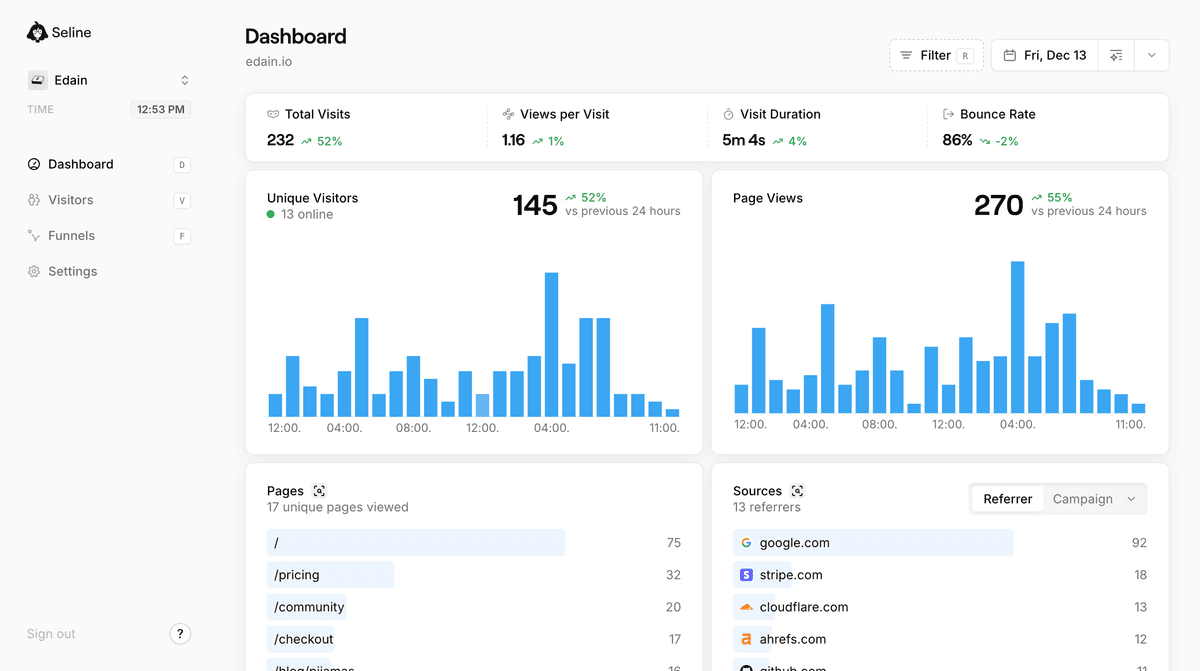
Fathom is strong, but there are trade-offs.
The short trial can feel limiting if you need more time to evaluate seasonality and campaign impact. Audience depth is also lighter than GA4, which may be a blocker for teams that rely on granular segmentation.
If you want a privacy-first alternative that stays simple and goes further on product analytics, Seline is built for that.
Seline combines a clean interface with deeper insights for growth teams. You still get straightforward website analytics, plus advanced tools that help you understand revenue and user behavior in one place.
Two new features make this especially useful:
- Revenue Analytics shows which channels, pages, and campaigns lead to actual revenue, not just clicks and sessions.
- Live View lets you monitor visitor activity in real time, so you can react quickly during launches, campaigns, or incident windows.
On top of that, Seline supports visitor journeys, funnels, and profile-level behavior views, so you can see where users convert, where they drop off, and what to improve next.
That combination makes Seline useful for both SEO and revenue teams. You can connect traffic quality to business outcomes, not just pageview volume.
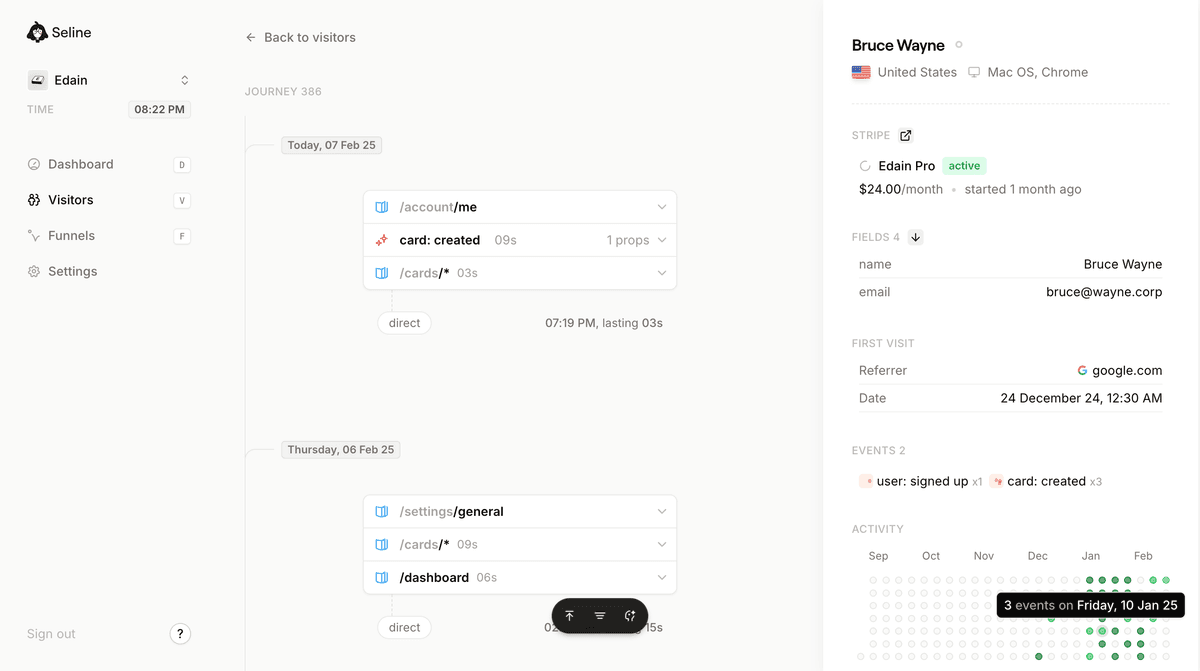
Seline also keeps pricing flexible as you grow, with plans that map to actual usage instead of rigid bundles.
If you want easy analytics without giving up revenue visibility and live monitoring, Seline is worth trying.