Is Google Analytics GDPR Compliant? Here's What You Need to Know in 2026
No. Google Analytics is not GDPR compliant by default.
Google Analytics 4 (GA4) still sets cookies, collects personal data, and sends that data to Google. Google Analytics GDPR compliance is something you configure, not something you get by installing the tag.
If you serve visitors in the EU or EEA, you have two paths:
- Keep GA4 and work through a 9-step Google Analytics GDPR compliance checklist (privacy policy, consent banner, data sharing, DPA, Consent Mode v2, and more).
- Switch to cookieless analytics that doesn't collect personal data, so you can skip the banner and most of the legal overhead.
This guide covers both. It is a practical walkthrough, not legal advice. If you process a lot of EU traffic, have a lawyer review your setup.
What is the GDPR?
The General Data Protection Regulation (GDPR) is the EU's data protection law. It has applied since 25 May 2018. It gives people in the EU and EEA control over their personal data: what you collect, why you collect it, where it goes, and how long you keep it.
Fines can reach €20 million or 4% of worldwide annual turnover, whichever is higher. Supervisory authorities can also order you to stop processing. For most site owners, the operational cost is the real issue: cookie banners, consent logs, data-processing contracts, and the risk of an investigation.
GDPR sits next to the ePrivacy rules (the "cookie law"). That pairing is why GA4 GDPR questions almost always come back to cookies and consent, not only to Google's privacy settings.
Who does GDPR apply to?
GDPR applies if you:
- Are established in the EU or EEA, or
- Offer goods or services to people in the EU/EEA, or
- Monitor the behavior of people in the EU/EEA (website analytics counts)
You do not need an EU company, EU servers, or EU customers on paper. EU visitor traffic is enough. A US SaaS with European sign-ups, a blog with EU readers, or an ecommerce store that ships to France all sit in scope.
The UK has UK GDPR, which is largely aligned. If you have UK visitors, treat the same rules as a working baseline.
Under GDPR you are usually the controller (you decide to run analytics). Google is a processor for Analytics data. That split is why you need a Data Processing Agreement, even if you never look at a user's name.
What counts as personal data under GDPR?
Personal data is any information that identifies a person, directly or indirectly. It is broader than name and email.
For web analytics, that typically includes:
- IP addresses
- Cookie identifiers (
_ga,_ga_*, client IDs) - Device and browser fingerprints
- Online identifiers and user IDs you send into GA4
- Precise location, or location inferred from an IP
- Event data that can be tied back to a person (email, customer ID, name in a URL)
Anonymous, aggregate counts with no identifier are not personal data. GA4's default hit is not that. A client ID plus device data plus behavior over time is personal data under GDPR, even if you never learn the visitor's name.
That definition is the whole GDPR Google Analytics problem: the product is built to recognize returning users.
Is Google Analytics GDPR Compliant by Default?
No. Out of the box, Google Analytics 4 GDPR compliance fails on cookies, consent, data sharing, and (depending on your setup) transfers and advertising features.
Google ships privacy tools. It does not ship a compliant configuration. Until you change defaults, restrict Google's use of the data, get a valid legal basis, and document it, you should not treat GA4 as GDPR compliant analytics.

How Google Analytics collects personal data
GA4 is event-based. The browser (or your server container) sends events to Google with identifiers attached so reports can count users, sessions, and returning visitors.
A typical GA4 install collects:
- Cookies and IDs.
_gaand_ga_<container>cookies, plus a client ID. These persist and re-identify the browser. - Device and browser data. OS, browser, screen, language, device category.
- Location. Derived from IP. GA4 says it does not store IP addresses, but the IP is still processed to get geo data.
- Behavior. Pages, titles, referrers, UTMs, scrolls, clicks, file downloads, video events, and anything you add as a custom event.
- Optional advertising data. Google Signals, Ads links, demographics, and interest categories if those features are on.
None of that is "anonymous traffic stats." It is tracking. Under GDPR and ePrivacy, tracking cookies need a valid legal basis, which for analytics cookies in the EU almost always means prior consent.
Why GA4 may still violate GDPR
Even after you turn on a few privacy toggles, Google Analytics 4 GDPR issues tend to remain:
Cookies without prior consent. If the GA tag fires on landing, you collected personal data before the user said yes. That is the most common failure.
Google as a third party. Data leaves your site and goes to Google. CNIL's exemption for some strictly necessary analytics cookies does not cover tools that share data with a third party for their own purposes. GA4 is not a first-party-only log.
Data sharing and advertising features. Account-level sharing, Google Signals, and Ads personalization expand processing beyond "I want to see which pages got traffic."
Retention. Defaults keep event-level user data longer than many teams need.
International transfers. Google is US-headquartered. The EU-US Data Privacy Framework (2023) gave Google a transfer mechanism while it remains certified, but DPAs still expect you to assess transfers, sign the DPA, and not treat the Framework as a free pass to skip consent.
Consent Mode is not a legal stamp. Google Consent Mode v2 is a tag-behavior spec. It does not replace a lawful basis, a privacy policy, or a DPA.
IP anonymization, which used to be the Universal Analytics talking point, is already the GA4 default. It does not make the rest of the processing lawful.
What EU data protection authorities have ruled
This is not theoretical. Between 2022 and 2023, several EU authorities held that sites using Google Analytics violated GDPR, mainly because of US data transfers after Schrems II:
- Austria (DSB), January 2022. First widely cited decision: Google Analytics on a site was not GDPR-compliant due to US access risk.
- France (CNIL), February 2022. Ordered sites to stop using Google Analytics and fined organizations that continued. CNIL's line since: standard GA does not qualify as exempt, consent-free analytics.
- Italy (Garante), June 2022. Same core finding on transfers and Google Analytics.
- Denmark, Norway, Finland and others followed with similar guidance or decisions.
Two things changed after those headlines, and one thing did not.
What changed: the EU-US Data Privacy Framework now exists, and Google is certified under it. That is a lawful transfer tool if it remains valid. Universal Analytics is also gone; everyone is on GA4.
What did not change: you still need consent for Google Analytics cookies in the EU. Authorities have not said "GA4 is fine now." They have said transfers need a valid mechanism and that analytics cookies generally need opt-in. Cookie banners, a DPA, and data minimization are still on you.
If your legal basis is "everyone else uses GA4," that is not a legal basis.
How to Make Google Analytics GDPR Compliant (9-Step Checklist)
Use this as a working Google Analytics GDPR compliance checklist. Do all nine if you keep GA4 for EU traffic. Skipping consent or the DPA undoes the rest.
- Update your privacy policy
- Implement a cookie consent banner
- Enable IP anonymization (verify GA4 behavior)
- Disable data sharing with Google
- Set up data retention limits
- Sign a Data Processing Agreement with Google
- Enable Google Consent Mode v2
- Restrict advertising data features
- Consider server-side tagging
Then test in an EU VPN: GA cookies should not appear until analytics consent is granted.
1. Update your privacy policy
Name Google Analytics as a processor. A generic "we use cookies to improve the site" line is not enough.
Your policy should state:
- That you use Google Analytics 4
- What you collect (cookies, identifiers, device data, events, approximate location)
- Why (audience measurement, on the legal basis of consent)
- That Google is the processor, with a link to Google's Google Analytics safeguards
- Retention period (match the setting in step 5)
- International transfers and the mechanism you rely on (e.g. Data Privacy Framework plus SCCs in Google's terms)
- How to withdraw consent and how to request access or deletion
Link the policy from the banner, the footer, and the consent preferences button. Keep it in the same language as the site.
2. Implement a cookie consent banner
This is the step that actually blocks the tag.
Requirements that keep showing up in enforcement:
- Prior opt-in. No GA cookies until the user accepts analytics. Reject must be as easy as accept. No pre-ticked boxes.
- Granular categories. Separate necessary, analytics, and marketing. Don't bundle GA with ads.
- Proof. Store consent records (what was chosen, when, which policy version).
- Withdrawal. A persistent button to change consent later.
Use a CMP that supports Google Consent Mode v2 (Cookiebot, CookieYes, OneTrust, Complianz, and similar). Load GA through that CMP, or through Google Tag Manager that reads the CMP's consent state.
If the _ga cookie is present on first paint, before a click, the banner is theater.
3. Enable IP anonymization
In Universal Analytics you had to set anonymize_ip. In GA4, Google does not log or store IP addresses. Geo is derived, then the IP is discarded.
Do this anyway:
- Confirm the property is GA4, not a leftover UA snippet
- Never send raw IP, email, name, or customer ID as an event parameter or user property
- Strip PII from page URLs (email in query strings is a frequent leak)
- If you use server-side tagging, drop the IP before the event is forwarded to Google
IP anonymization reduces one identifier. It does not remove cookie IDs, and it does not replace consent. Treat it as hygiene, not as the compliance win.
4. Disable data sharing with Google
By default, Google can use Analytics data for its own products and benchmarking. That is extra processing you probably don't need.
In GA4:
- Admin → Account Settings
- Open Account Data Sharing Settings
- Turn off Google products & services
- Turn off Benchmarking
- Leave support sharing off unless you are in an active Google support case
Then check Admin → Product Links and remove Ads, Ad Manager, and BigQuery links you don't use. Linking Ads is often how analytics data becomes advertising data.
5. Set up data retention limits
GDPR requires storage limitation. You should not keep event-level user data forever because the UI makes it easy.
In GA4:
- Admin → Data Settings → Data Retention
- Set Event data retention to 2 months if you can live with it, or 14 months as a ceiling
- Turn Reset user data on new activity off if you want the clock to actually run out
2 months is the stricter GDPR-friendly choice. 14 months is the maximum GA4 offers for standard properties. "Do not automatically expire" is the wrong answer for EU personal data.
Standard aggregated reports still work after events expire. Explorations and some user-level analysis will not.
6. Sign a Data Processing Agreement with Google
You cannot lawfully appoint Google as a processor without a contract that meets Article 28.
Google's contract is the Google Ads Data Processing Terms. For Analytics:
- Admin → Account Settings
- Accept the Data Processing Terms if they are not already accepted
- Save a copy (PDF or screenshot with timestamp) with your compliance records
- List Google in your internal processor register
If you use Google Tag Manager, Ads, or a server-side GTM cluster on Cloud Run, those are separate processing activities. Cover them too.
7. Enable Google Consent Mode v2
Consent Mode tells Google tags whether ad_storage, analytics_storage, ad_user_data, and ad_personalization are granted. v2 (the ad_user_data and ad_personalization flags) has been required since March 2024 for Google advertising measurement in the EEA, UK, and Switzerland.
Set defaults to denied before any Google tag runs:
gtag('consent', 'default', {
  ad_storage: 'denied',
  analytics_storage: 'denied',
  ad_user_data: 'denied',
  ad_personalization: 'denied',
  wait_for_update: 500,
});
When the user accepts analytics, your CMP should update consent and set analytics_storage to granted. Marketing consent is a separate update.
Basic Consent Mode: blocked tags send nothing until consent. Prefer this for GDPR.
Advanced Consent Mode: cookieless pings still go to Google when consent is denied, so Google can model conversions. That is still processing. Don't turn it on to "stay compliant." Turn it on only if you understand that trade and your lawyer is fine with it.
A CMP that claims "GA4 GDPR" support should map its analytics category to analytics_storage and its ads category to the ad flags. Test with Tag Assistant.
8. Restrict advertising data features
GA4's advertising layer is optional. For a site that only needs traffic reports, it should be off.
In GA4:
- Admin → Data Settings → Data Collection
- Disable Google signals
- Disable Granular location and device data collection if you don't need it
- Admin → Data Settings → Data Collection / Ads-related settings: turn off Ads personalization where present
- Don't enable User-ID unless you have a separate, documented lawful basis for logged-in tracking
Google signals uses signed-in Google data. It is one of the fastest ways to turn "pageview stats" into cross-context advertising data. If you don't run Google Ads, you don't need it.
9. Consider server-side tagging
Server-side Google Tag Manager moves the hit from the browser to a server you control, then forwards it to GA4. It can help Google Analytics GDPR compliance in one narrow way: you can strip emails, IPs, and leftover query params before Google sees them.
It does not:
- Remove the need for consent if you still set
_gaor equivalent identifiers - Keep data inside the EU by itself (your container region and Google's processing still matter)
- Make Google a first-party analytics tool
If you invest here, host the container in the EU, send only fields you need, and keep the same consent gate you use client-side. Treat it as hardening on top of steps 1–8, not a substitute.
After all nine, re-test: consent denied → no GA cookies, no GA4 hits. Consent granted → hits flow, policy and DPA in place, sharing and Signals off.
If that list feels like a second product to maintain, you are looking at the actual cost of GA4 in Europe.
The Alternative: GDPR-Compliant Analytics Without the Checklist
The other option is to stop using a tracker that needs this much legal scaffolding. GDPR compliant web analytics exists. It looks like traffic, sources, pages, and conversions, without cookies or a Google processor relationship.
A GDPR-compliant Google Analytics alternative is usually cookieless, EU-hosted or EU-friendly, and limited to aggregate measurement.
What makes an analytics tool truly GDPR compliant?
Check the product, not the homepage badge.
- No tracking cookies by default. If it doesn't store an identifier in the browser, ePrivacy consent for analytics cookies often doesn't apply.
- No personal data (or a documented, optional layer). Daily unique counts via a salted hash that is not stored as an IP is a different design from a persistent client ID.
- You are not sending data to an ad network. The vendor shouldn't use your visitors for their own advertising.
- EU company and EU hosting, or a real transfer story. A DPA you can actually sign.
- Data minimization. Retention you control. Deletion that works.
- No cross-site fingerprinting. Privacy theater that replaces cookies with a stable device fingerprint is worse, not better.
Plausible, Fathom, Simple Analytics, and Seline are built on that model. Matomo can be, if you turn off cookies and host it yourself. GA4 is not, until you complete the checklist above, and even then you are still using Google.
See the web analytics tools comparison if you want the wider field.
Seline - no cookies, no consent banner needed
Seline is cookieless GDPR-compliant analytics. Default tracking does not set cookies, does not store IP addresses, and does not collect personal data unless you later send it on purpose (for example a logged-in profile).
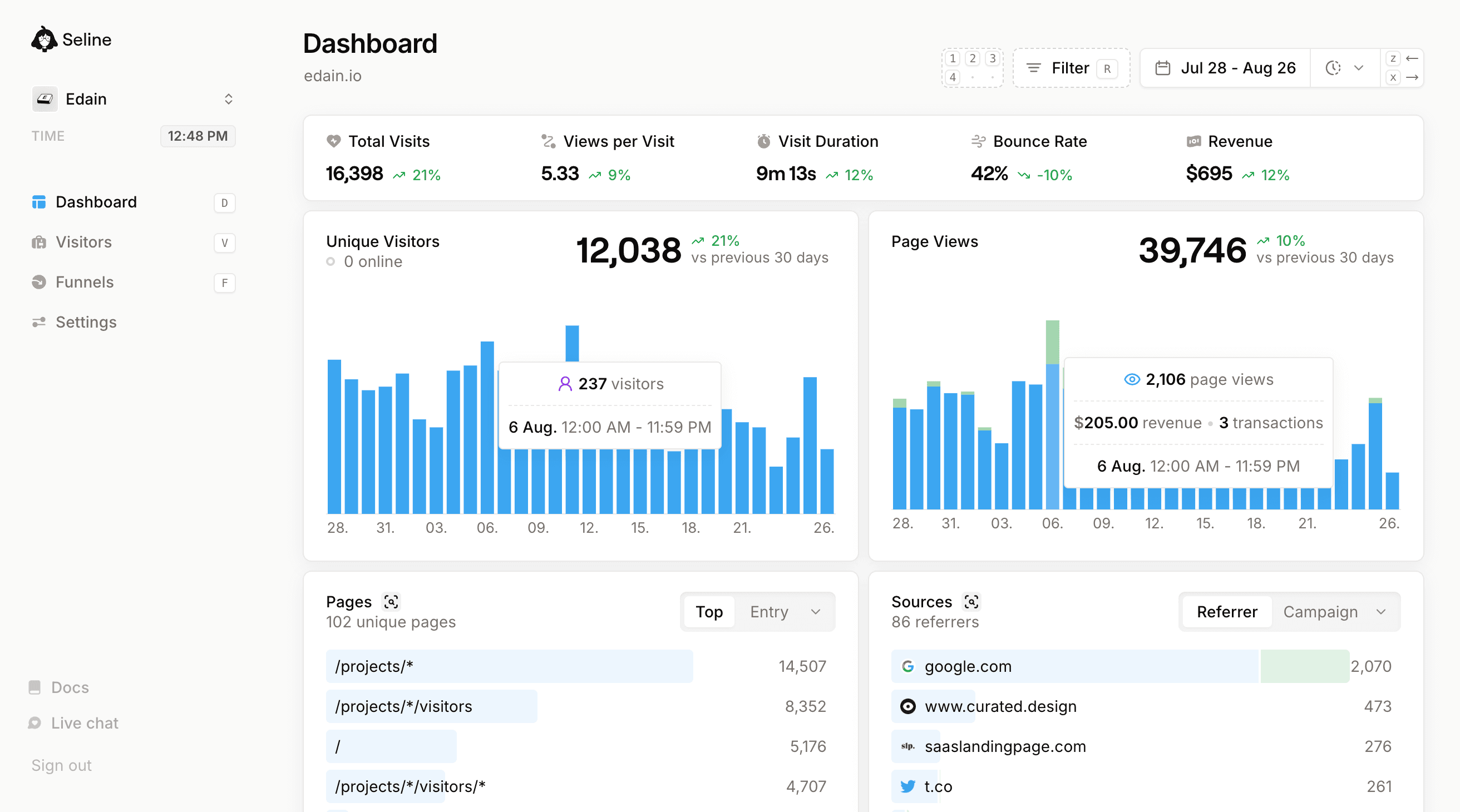
That is the point of the product: you get traffic, referrers, pages, UTMs, events, optional funnels, and revenue, without running a CMP just to see yesterday's visits.
- No cookies. No analytics banner for standard tracking. See the GDPR page.
- EU-based. Company in Poland, hosting in Germany.
- No third-party sharing. Visitor data is not sold or used for ads.
- Lightweight script. One tag, no GA4 property wizard.
If you do attach emails or names to visitor profiles, you become responsible for that extra personal data, same as with any processor. The default install does not.
Start a free Seline trial if you want the reports without the nine-step project.
Get started with web analytics for free.
Sign up for Seline now - no credit card required. Cookieless, privacy-friendly, independent.
Get started
Frequently Asked Questions
Is GA4 GDPR compliant in 2026?
No. GA4 GDPR compliance is not the default. Google Analytics 4 still uses cookies, collects personal data, and sends it to Google. You can lower the risk with the 9-step checklist in this guide (consent, DPA, data-sharing limits, retention, Consent Mode v2, advertising features off). The EU-US Data Privacy Framework did not make an unconfigured GA4 tag lawful. If you want GDPR compliant analytics without that work, use a cookieless tool.
Do I need a cookie banner for Google Analytics?
Yes, for EU/EEA (and typically UK) visitors. Google Analytics sets _ga cookies. Under GDPR and ePrivacy, those cookies need prior opt-in. A banner that doesn't block the tag is not enough. Cookieless tools such as Seline, Plausible, and Fathom are designed so standard traffic measurement doesn't need an analytics consent banner.
What happens if I use Google Analytics without GDPR compliance?
You risk an investigation, an order to stop using Google Analytics, and fines of up to €20 million or 4% of worldwide annual turnover. French, Austrian, and Italian authorities have already acted against sites using Google Analytics. You also collect consent you can't defend, which is a trust problem as much as a legal one.
Which analytics tools are GDPR compliant without consent?
Tools that don't set tracking cookies and don't collect personal data for default pageview measurement. Seline, Plausible, Fathom, and Simple Analytics are the usual Google Analytics alternative GDPR compliant options. Confirm EU hosting or transfers, a DPA, and that fingerprinting isn't doing the cookie's job under another name. Google Analytics is not in this group: it needs a cookie banner and the checklist above.
If you want to keep GA4, work the nine steps and re-test consent. If you want GDPR-compliant analytics without the banner, switch.