Funnel Analysis: What It Is, How It Works & Best Tools
Traffic is nice, but it does not pay the bills on its own.
You can have a healthy stream of visitors, a polished landing page, and a product people seem interested in. Then you open your analytics and see the same problem again: not enough people are signing up, buying, booking a demo, or finishing checkout.
That is where funnel analysis helps. It shows the path people take before they convert, then highlights where they leave. Instead of guessing whether your pricing page is confusing or your signup form is too long, you can look at the steps and see where the leak starts.
In this guide, we will cover what funnel analysis is, how it works, how to run a useful funnel analysis, and which tools make it easier.
What Is Funnel Analysis?
Funnel analysis is the process of tracking the steps people take before completing a goal on your website or product.
That goal could be:
- Starting a free trial.
- Buying a product.
- Booking a demo.
- Creating an account.
- Downloading a lead magnet.
- Completing onboarding.
A funnel turns that journey into clear steps. For example, a SaaS funnel might look like this:
- Visitor lands on the homepage.
- Visitor opens the pricing page.
- Visitor clicks "Start free trial".
- Visitor creates an account.
- Visitor finishes onboarding.
Funnel analysis shows how many people move from one step to the next. More importantly, it shows where people stop. That makes it a useful part of product analytics, SaaS analytics, and conversion rate optimization.
Example Funnel Flow
Here is a simple e-commerce funnel:
- Visitor lands on a product listing page.
- Visitor opens a product page.
- Visitor adds the product to cart.
- Visitor reaches checkout.
- Visitor completes the order.
If 70% of visitors reach checkout but only 12% complete the order, you know the problem is probably near the end of the journey. Maybe shipping costs appear too late. Maybe the payment form feels risky. Maybe the checkout page is slow on mobile.
Here is a simple SaaS funnel:
- Visitor lands on the homepage.
- Visitor opens the pricing page.
- Visitor starts a free trial.
- Visitor verifies email.
- Visitor completes the first important action in the product.
If people start trials but do not reach the first meaningful action, the problem is less about acquisition and more about activation. That is the kind of insight you miss when you only look at pageviews or total signups.
How Funnel Analysis Works
Funnel analysis works by measuring conversion between each step in a journey.
Say 10,000 people visit a pricing page. Of those, 1,200 click "Start trial". Of those, 900 create an account. Of those, 300 invite a teammate.
The total conversion rate matters, but the step-by-step view matters more. It tells you where to focus.
If the biggest drop is between pricing and trial start, your pricing page might need clearer plans, stronger proof, or a better call to action. If the biggest drop is after account creation, your onboarding might be asking for too much too soon.
Good funnel analysis also becomes more useful when you segment it. For example, compare:
- Mobile vs desktop visitors.
- Paid traffic vs organic traffic.
- New visitors vs returning visitors.
- US traffic vs EU traffic.
- Customers from different campaigns or UTMs.
This is where funnels connect with website visitor tracking and revenue analytics. A funnel can show where users drop off. Revenue data can show which paths bring customers who actually pay.
How to Do Funnel Analysis (Step-by-Step)
Funnel analysis does not need to be complicated. The best funnels are usually simple, focused, and tied to one real business goal.
1. Define Your Funnel Goals
Start with one action that matters. Do not build a huge funnel because it looks impressive. Pick a goal that is close to value.
For example:
- A SaaS company might track free trial activation.
- An e-commerce store might track completed purchases.
- An agency might track demo bookings.
- A newsletter might track confirmed subscriptions.
Once the goal is clear, list the steps people must take before they reach it.
2. Map Out the Funnel Stages
Map the main path first. You can add more detail later.
For e-commerce, the funnel might be:
- Product listing page → Product detail page → Add to cart → Checkout → Order confirmation.
For SaaS, it might be:
- Homepage → Blog post → Free trial CTA → Signup form → Confirmation.
For a content-led business, it might be:
- Blog post → Product page → Signup page → Account created.
If the funnel starts from a landing page, it is also worth tracking the landing page metrics around that first step. Weak traffic quality or unclear intent at the top of the funnel can make everything below it look worse.
3. Set Up Tracking
Next, make sure each step is tracked. Depending on the funnel, that might mean tracking pageviews, button clicks, form submissions, signups, purchases, or custom events.
For simple funnels, page URLs might be enough. For product funnels, you will usually need events. Seline supports custom event tracking, so you can track actions like trial started, checkout opened, plan selected, or feature used.
The goal is not to track everything. Track the few actions that explain whether people are moving forward.
4. Analyze Drop-Off Rates
Once the funnel is live, look for the biggest drop-off between steps.
Ask questions like:
- Are people leaving after viewing the pricing page?
- Are users starting checkout but not paying?
- Are trial users creating accounts but not completing setup?
- Are mobile users dropping off more often than desktop users?
The biggest drop-off is usually the best place to start. It gives you a focused problem instead of a vague "conversion is low" complaint.
5. Investigate the Why Behind Drop-Offs
The number tells you where to look. It does not always tell you why people are leaving.
This is where you combine funnel data with common sense, session recordings, customer feedback, support tickets, and CRO marketing work.
For example:
- If people leave at checkout, check payment options, shipping costs, trust signals, and form length.
- If people leave on pricing, check whether plans are clear and whether the page answers common objections.
- If people leave during onboarding, check whether the first step asks too much before users see value.
- If one traffic source converts badly, check whether the campaign promise matches the landing page.
6. Optimize and Iterate
Make one meaningful change, then measure again.
That could mean shortening a form, rewriting a call to action, moving social proof closer to the decision point, improving page speed, simplifying pricing, or changing the onboarding order.
Funnel analysis is not a one-time report. It is a loop:
- Find the drop-off.
- Form a likely explanation.
- Improve the step.
- Measure the result.
- Repeat.
Now, let’s talk about some of the tools you can use for funnel analysis.
Best Funnel Analysis Tools
The best funnel analysis tool depends on how much detail you need and how much setup you are willing to manage. Here are four common options.
1. Seline
Seline is a simple, privacy-friendly analytics tool with funnels built in. It is a good fit if you want to understand conversion paths without turning analytics into a separate job.
You can track page-based funnels, event-based funnels, and logged-in user journeys. That makes it useful for websites, SaaS products, e-commerce flows, and content-led funnels. It also connects with revenue analytics, so you can see which funnels lead to actual customers, not just form fills.
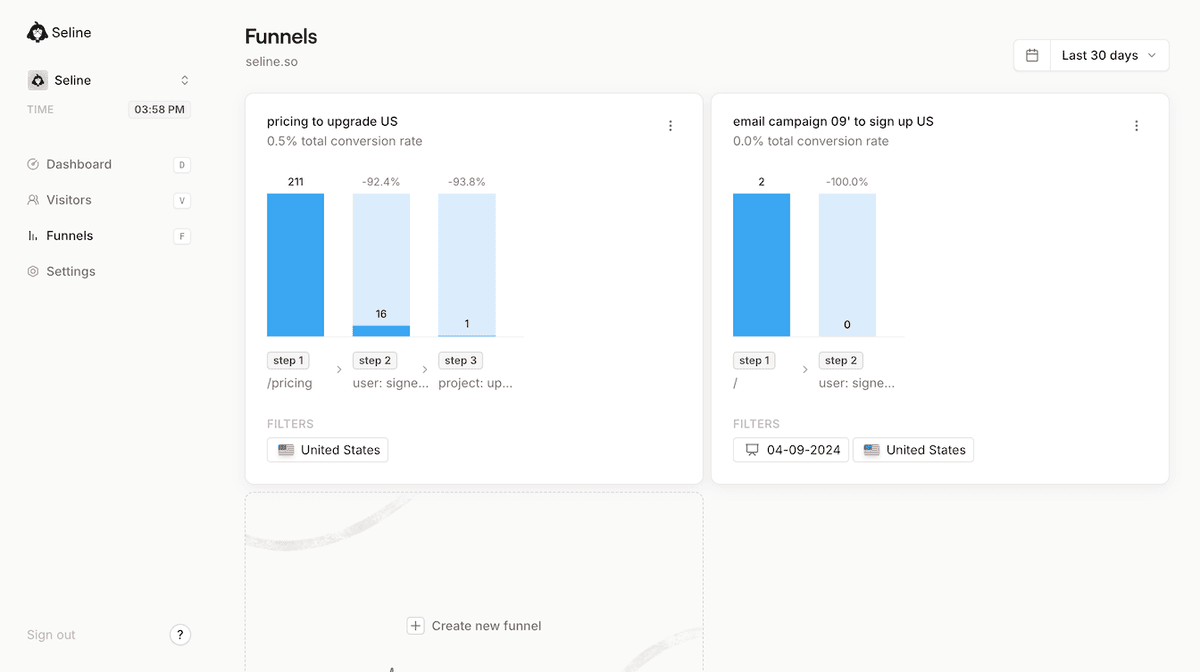
Seline is also cookieless by default and built with privacy in mind. If you care about simple funnels, clean dashboards, and GDPR-compliant analytics, it is a strong place to start.
2. Google Analytics
Google Analytics 4 can handle funnel exploration, especially if your team already uses GA4 and has events configured well.
The downside is setup. You need to understand GA4 events, conversions, explorations, and reporting quirks. For many teams, the tool is powerful but harder than it needs to be. If you are already questioning whether GA4 is worth the work, read the Google Analytics vs Seline comparison or this guide to Google Analytics alternatives.
3. Hotjar
Hotjar is best known for heatmaps and session recordings. It can help you understand what people do on a page after your funnel shows where they drop off.
For example, if your funnel shows a big checkout drop, Hotjar can help you watch sessions and spot rage clicks, confusing forms, or layout problems. It is often more useful as a research layer than as your main analytics dashboard.
4. Funnelytics
Funnelytics is built around visual funnel mapping. It can be useful for marketers who want to plan and model funnels before or during campaign work.
It is less ideal if you simply want a clean analytics dashboard for everyday website and product decisions. For that, a tool like Seline is usually faster to use.
For most small teams, the best tool is the one you will actually check every week. If a funnel report takes too much setup or explanation, it will probably sit unused.
Start Optimizing Your Website Funnel with Seline
Funnel optimization is about making the path to conversion easier. That might mean clearer copy, fewer form fields, better proof, faster pages, stronger onboarding, or a better match between your traffic source and landing page.
The hard part is knowing where to start. Seline helps by showing the steps clearly, so you can focus on the part of the journey that is losing the most people.
How Seline Simplifies Funnel Analysis
Seline keeps funnel analysis practical:
- Easy funnel setup: Build funnels from pageviews or events without fighting a complex reporting interface.
- Clear drop-off view: See where people leave, then focus your optimization work there.
- Visitor journeys: Look at individual paths when aggregate numbers are not enough.
- Revenue context: Connect funnel performance to sales, subscriptions, and channels.
- Privacy-first tracking: Analyze behavior without invasive tracking or cookie-heavy analytics.
If you want a broader view of the dashboard before trying it, see these web analytics dashboard examples. If you are coming from a simpler setup, this guide to simple web analytics is also a good next read.
Sign up for Seline and start tracking the funnels that actually matter.