Product Analytics: What Is it and How to Get Started
Imagine you run a product that looks healthy from the outside.
New users are signing up. A few customers are upgrading. People tell you the product is useful. But when you look closer, the picture gets less clear.
Which features keep people coming back? Where do new users get stuck? Which actions usually happen before someone converts? Why do some accounts quietly disappear after the first session?
Those questions are hard to answer from opinions alone. You need to see what people actually do.
That is what product analytics is for. It helps you understand user behavior inside your website, app, or digital product so you can improve the parts that matter.
In this guide, we will cover what product analytics is, why it matters, which metrics to track, and which tools can help.
What is Product Analytics?
Product analytics is the process of tracking and analyzing how people use a digital product.
That can include pageviews, clicks, signups, feature usage, onboarding steps, conversion events, retention, and revenue. The point is to understand the user journey, not just count traffic.
For example, product analytics can show:
- Which features are used most often.
- Which onboarding step loses the most users.
- Which traffic sources bring activated users.
- Which actions happen before a paid upgrade.
- Which parts of the product are ignored.
It is closely related to funnel analysis, SaaS analytics, and revenue analytics. Product analytics explains behavior. Funnel analysis shows drop-offs. Revenue analytics connects those actions to money.
The best product analytics setup helps teams move from "we think users do this" to "we can see users do this."
Why Is Product Analytics Important?
Product analytics is useful because different teams need the same source of truth. Product, marketing, design, engineering, support, and leadership all look at the product from different angles. Good analytics helps them make decisions from the same reality.
For Product Managers: Making Data-Driven Decisions
Product managers need to know what to build, improve, or remove. Product analytics shows which features users rely on, where adoption is weak, and which flows create the most friction.
For UX/UI Designers: Enhancing User Experience
Designers can use product analytics to find confusing flows, ignored elements, and points where users stop moving forward. It is especially useful when paired with qualitative feedback and session research.
For Marketers: Identifying and Leveraging Popular Features
Marketers can see which campaigns bring users who activate, not just visitors who click. That matters for positioning, landing pages, paid campaigns, and content strategy.
For Customer Success Teams: Reducing Churn by Addressing Pain Points
Customer success teams can spot accounts that are losing engagement or missing important setup steps. That gives them a chance to help before the customer churns.
For Developers: Prioritizing Fixes and Enhancements
Developers can use product analytics to understand which bugs, slow pages, or confusing flows affect the most users. That helps prioritize fixes with real impact.
For Executives: Tracking Product Success and ROI
Executives need to know whether product work is helping the business. Product analytics can connect usage, retention, conversion, and revenue so leadership can see whether the product is moving in the right direction.
When everyone can see the same product behavior, conversations get sharper.
Key Metrics in Product Analytics
You do not need to track every possible metric. Start with the ones that explain whether users find value and keep coming back.
- User engagement: Track which pages, features, and actions users interact with. Engagement helps you see where value is being created.
- Retention rate: Measure how many users return over time. Retention is one of the clearest signals that the product is useful.
- Conversion rate: Track how many users complete key actions like signup, activation, upgrade, or purchase. For deeper optimization, combine this with CRO marketing.
- Time on page or feature: See how long users spend in important parts of the product. Long time can mean engagement, but it can also mean confusion, so always read it in context.
- Daily and monthly active users: DAU and MAU show how often users return. They are useful for products where regular usage is part of the value.
- Feature adoption: Track whether users discover and use important features. For product actions, custom event tracking is usually more useful than pageviews alone.
- User journey paths: Look at the sequence of actions people take before they activate, upgrade, or leave. This is where website visitor tracking can help connect marketing pages and product behavior.
The most useful metrics are the ones tied to a decision. If you do not know what you would change based on a metric, it may not be worth tracking yet.
Product Analytics Tools
The best product analytics tool depends on your product, team size, and tolerance for setup. Here are some common options.
1. Seline: Simplified Product Analytics
Seline gives teams a simple way to track product behavior without the overhead of traditional analytics tools. You can follow user journeys, build funnels, track custom events, and connect behavior to revenue.
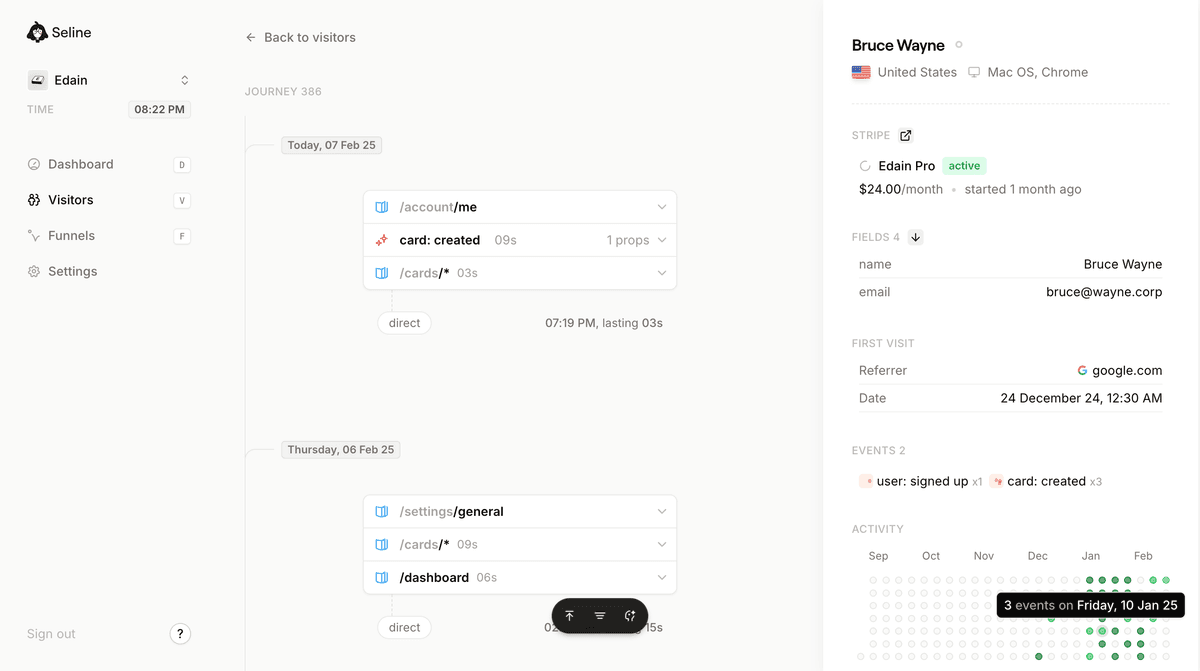
Seline works especially well for teams that want product insight alongside website analytics. You can see how people arrive, what they do before converting, where they drop off, and which users or channels generate revenue.
It is also privacy-first and cookieless by default, which makes it a cleaner fit for teams that care about GDPR-compliant analytics.
Sign up for Seline and see your product journeys in a clean dashboard. SaaS teams can start on the SaaS analytics page.
2. Google Analytics: Comprehensive Web Traffic and Conversion Insights
Google Analytics 4 can track product behavior if you configure events and conversions properly. It is widely used and powerful, especially for teams already deep in the Google ecosystem.
The tradeoff is complexity. GA4 can feel heavy when all you need is a clear view of funnels, journeys, and conversion paths. If you are weighing alternatives, read the Google Analytics vs Seline comparison.
3. Mixpanel: Detailed User Behavior and Retention Tracking
Mixpanel specializes in event-based product analytics. It is strong for cohorts, retention, feature usage, and detailed behavioral analysis.
It can be a good fit for larger product teams, but smaller teams should consider the setup and pricing before committing. This Mixpanel pricing guide can help with that decision.
4. Amplitude: Advanced Behavioral Analytics for Product Teams
Amplitude is built for deeper behavioral analytics. Product teams use it for funnels, cohorts, retention, feature adoption, and user segmentation.
It is powerful, but it can be more than a small team needs. If you want a simpler alternative, see Amplitude vs Seline.
5. Heap: Automatic Data Capture for Seamless Event Tracking
Heap automatically captures user interactions, which helps teams analyze behavior without defining every event upfront. That retroactive data can be useful, but teams still need clean naming and reporting habits to keep analysis understandable.
6. Pendo: Specialized in Product Adoption and In-App User Feedback
Pendo combines product usage analytics with in-app guides, surveys, and feedback tools. It is often useful for SaaS teams that want analytics and product adoption workflows in the same platform.
7. FullStory: Comprehensive Session Replay and Digital Experience Analytics
FullStory focuses on session replay and digital experience analytics. It is helpful when you want to watch how users move through a flow and understand the friction behind a drop-off.
Each tool has a different center of gravity. Some are built for deep product teams. Some are built for revenue reporting. Some are better for UX research. Pick the one that matches the questions you actually need to answer.
Get Started with Product Analytics Using Seline
Understanding your users is no longer optional. It is how you build a product people keep using.
Product analytics helps you see where people find value, where they get stuck, and which actions lead to growth. The problem is that many tools make this harder than it needs to be.
Seline keeps it practical. You get funnel analysis, user journeys, custom events, revenue context, and a clean dashboard without turning analytics into a full-time job.
If you want to see how that looks in practice, browse these web analytics dashboard examples or start with this guide to simple web analytics.
Start your product analytics journey with Seline and focus on what users actually do.